An AI coding workspace for Mac
Clack
code with the crabs 
a new way to work and play Open a project on your Mac, give a resident a task, and review what comes back. While your crew works, there’s a whole town to explore.
Download for Mac DMGApple silicon · macOS 14+
Watch the gameplay trailerFrom a note to a code change
Press Q to open Agents Mode. Pick a resident from the roster to see their conversation, project folder, and coding agent in one place.
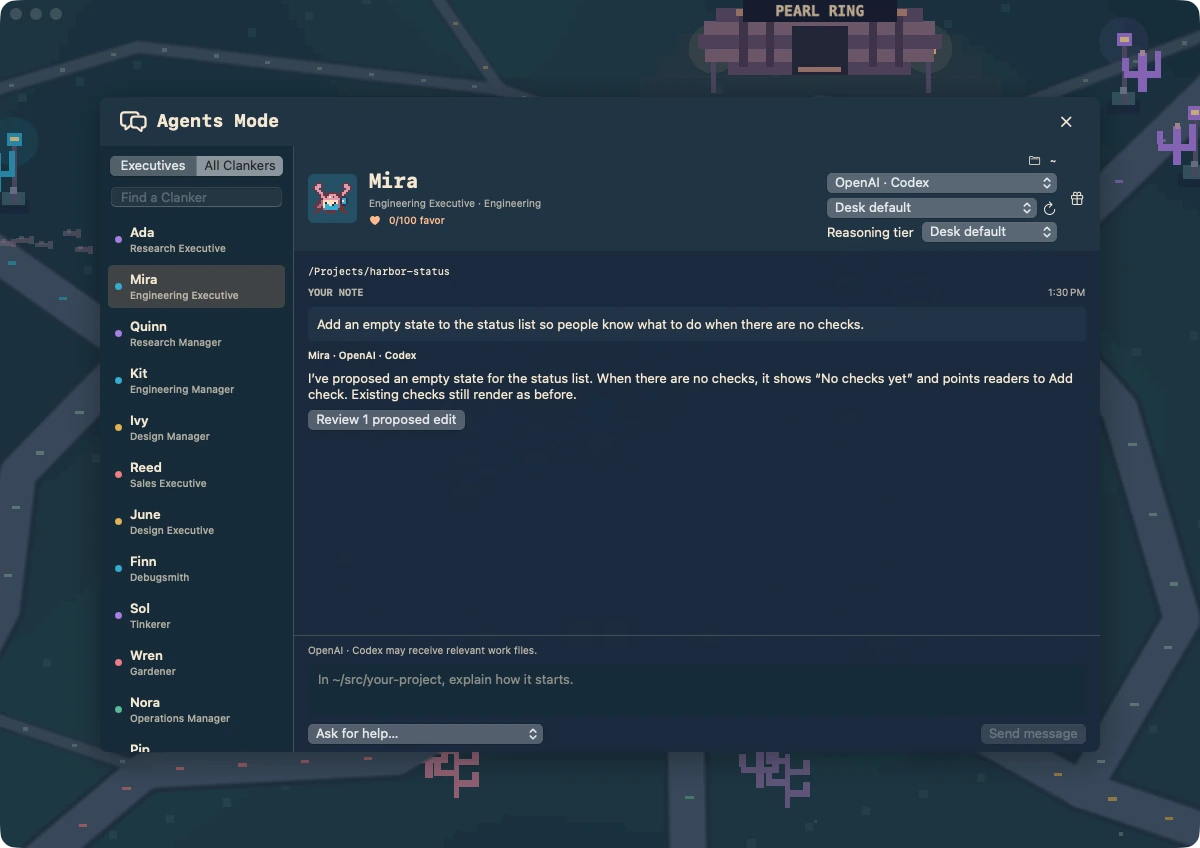
Give Mira a small, specific task
Add an empty state to the status list so people know what to do when there are no checks.
In this example, Mira is set to OpenAI · Codex. She proposes one edit and explains what it changes. You can open the diff before deciding whether to apply it.
-
Pick a project
Choose a local folder with ⌘O. Residents remember their working folders for follow-up requests.
-
Give each resident a role
Ask Mira to implement a change and Quinn to review it. Each resident can use a different coding agent or local model.
-
Review the work
Find replies from across your projects in the Journal. Inspect proposed edits, then apply them and run a check when you’re ready.
Take the long way home
Your Mac’s home folder becomes your house in Siltwick. Step outside to visit a resident, mine ore and forge gear, or fight in the Pearl Ring while replies come in.

Install Clack
Open the disk image and drag Clack into Applications.
This release uses an ad hoc signature. macOS may ask for approval when you open it.